Quick answer
How should you inspect a visitor in XenoFeels?
Inspect every XenoFeels visitor in the same evidence order: current rule sheet, identity fields, species or origin cues, document dates, entry reason, permits, vehicle details, cargo or scanner result, then the final decision. The order matters because the game is built around small contradictions. A visitor may look strange but be legal, or look harmless while a plate number, cargo note, or expired field breaks the case.
This page is different from a general how-to-play guide. It is a working inspection checklist for players who already understand the premise and want fewer missed approvals. The goal is to slow the case down just enough to name the evidence before you stamp. When the public build changes, exact case values may change, so the guide focuses on repeatable checks rather than inventing unverified case answers.
The safest source for screenshots, release status, demo availability, system requirements, and purchase or wishlist options is still the official XenoFeels Steam page. This guide uses compressed official Steam media for visual context and does not host installers, APK files, cracks, repacks, trainers, or mirror downloads.
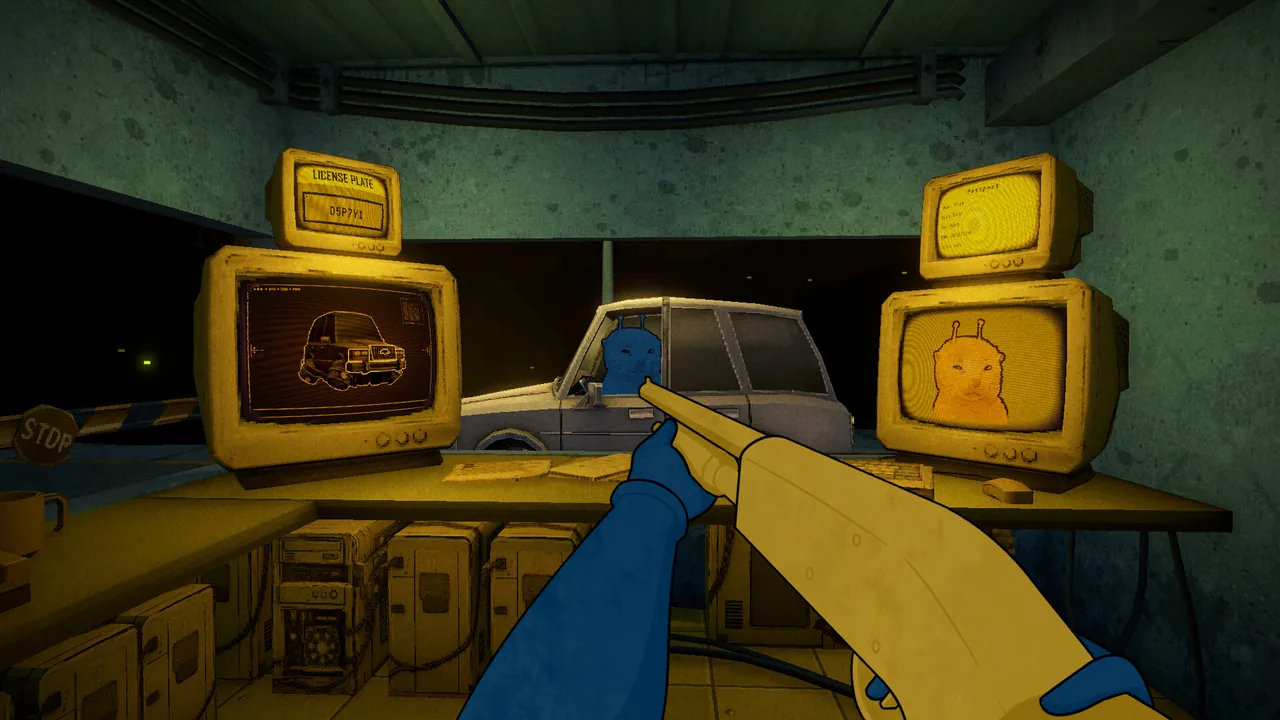
Current Steam wording names the most important evidence layers directly: compare photographs and documents with alien appearance and vehicles, then look for document errors, poor disguises, fake license plates, and prohibited objects hidden in the car. This guide now treats plate and contraband checks as core inspection work, not optional flavor.
Players searching for XenoFeels characters usually need help reading alien visitors, not invented names. Use appearance, dialogue, behavior, disguise, and vehicle context as prompts; decide only when rules, documents, plates, cargo, scans, or contraband provide evidence.
Inspection guide sections
The core XenoFeels inspection loop
Think of each case as a stack of evidence. You are not judging the alien from one clue; you are checking whether every clue still agrees with the current shift rules.
Rules first
Read the active rule sheet before the queue becomes busy. A new date, species limit, permit rule, or vehicle instruction can override yesterday's habit.
Documents second
Compare stable identity fields before variable details. Names, IDs, origin fields, dates, and permit purpose should be checked in the same order each time.
Alien cues as prompts
Behavior, appearance, and dialogue can tell you where to look next, but they should not replace a real mismatch, missing requirement, or scanner result.
Vehicles as evidence
When a vehicle appears, treat plate, cargo, manifest, and scan output as another document set rather than a side objective.
Named final reason
Before approving or denying, be able to say the exact reason. If you cannot name it, one more comparison is usually safer than a fast stamp.
Steam-safe sources
Keep game access decisions separate from guide reading. Use Steam or developer-linked channels only; avoid mirror installers and fake mobile builds.
Document check order for fewer missed contradictions
Use a fixed document order until it feels boring. Boring is useful here: it means you are less likely to skip a quiet mismatch when the queue speeds up.

-
Start with the active rule sheet
Check today's allowed entries, required fields, banned cargo, date logic, vehicle instructions, and any special alerts before examining a visitor. If a rule has changed, make that rule the first thing you verify for the next few cases.
-
Match identity fields before interpretation
Compare name, ID, origin or species marker, portrait or body cue, and any fixed identifier. Do this before you decide whether the visitor feels suspicious. Fixed fields are the easiest way to catch impostor-style contradictions.
-
Check dates and permits as a pair
Do not inspect dates alone. A valid-looking date still needs the correct permit type and entry reason. If a permit, visit purpose, or expiration field is present, tie those details back to the active rules.
-
Use dialogue as a pointer, not proof
If the visitor says something odd, use it to choose the next check. Treat dialogue as a clue that needs confirmation from paperwork, scan evidence, or the rule sheet.
-
Pause before stamping when two fields disagree
A single mismatch can be enough, but the best habit is to identify whether the conflict is rule-based, identity-based, date-based, purpose-based, vehicle-based, or cargo-based. That makes mistake review much easier.
Vehicle, plate, scanner, and cargo screening
Vehicle cases add a second evidence layer. A clean document does not automatically save a case when the vehicle or cargo contradicts the visitor story.

| Evidence layer | What to compare | Why it matters |
|---|---|---|
| Plate or vehicle ID | Match the plate, vehicle note, or identifier against the visitor claim and any permit field. | A vehicle mismatch can be the decisive contradiction even when the personal document looks clean. |
| Cargo note | Compare cargo wording with active restrictions, declared purpose, and any visual or scanner clue. | Cargo can turn a routine entry into a denial if the manifest conflicts with the shift rules. |
| Scanner result | Treat scan output as evidence that must agree with paperwork and dialogue. | Scanner clues are useful because they reduce guessing from appearance alone. |
| Visitor story | Check whether the spoken reason still fits the vehicle, cargo, route, and permit. | A story that fits the person but not the vehicle should slow the decision down. |
| Final stamp | Name the conflict before approving or denying. | A named reason helps you learn from penalties instead of repeating the same missed layer. |
Common inspection mistakes and safer habits
Most failed cases are not caused by missing everything. They usually come from trusting one clue too early or forgetting that a later evidence layer exists.
| Mistake | What happens | Safer habit |
|---|---|---|
| Starting with the visitor's look | You reject a strange-looking alien without a rule conflict or document mismatch. | Use appearance only to decide what to inspect next. |
| Skipping the rule sheet after a penalty | You repeat the same wrong assumption because the active rule changed. | After every penalty, reread the rule that caused it. |
| Checking plates last while rushing | A vehicle clue gets ignored because the personal document looked valid. | Treat vehicles as documents and give them a fixed place in the order. |
| Reading dates without purpose | You notice a date but miss that the permit or visit reason is not allowed. | Read dates, permit type, and entry reason together. |
| Approving without a named reason | The stamp happens before you can explain why the case passes. | Before stamping, name why the evidence is clean or which contradiction failed. |
A short practice routine for inspection consistency
Use this routine for a first hour, a demo session, or a return after a patch. It is designed to build stable habits rather than memorize unstable case data.
Run five slow cases
For five visitors, say the order out loud or read it silently: rules, identity, species, date, purpose, vehicle, cargo, decision. Speed is not the target yet.
Track one missed category
If you miss dates, run the next block focusing on dates and permits. If you miss vehicles, slow down every time a plate, cargo note, or scanner appears.
Separate evidence from suspicion
Write down whether a denial came from a rule, a document mismatch, a scan result, cargo, or only a feeling. Feelings should trigger inspection, not replace it.
Review Steam notes for build context
If the game is updated or a demo build changes, check the official Steam page before assuming every old example still applies.
Use the trailer as context, not as a full rulebook
A trailer or store video can show the tone, interface rhythm, and inspection fantasy, but it cannot replace the live rule sheet in the current build. Use video context to understand what to watch for, then rely on in-game evidence when deciding.
XenoFeels inspection FAQ
Sources and verification points
- Official XenoFeels Steam page - Official store page used for release status, screenshots, trailer media, system requirements, and wishlist/download decisions.
- SteamDB XenoFeels app record - Useful for public Steam metadata and change tracking, but not a replacement for the live Steam store page.