
Quick answer
What is the best way to start playing XenoFeels?
Start XenoFeels like an inspection routine, not a reflex test. Read the rule sheet first, then check identity, species or origin clues, document dates, entry reason, vehicle details, cargo or scan evidence, and only then approve or deny the visitor.
The main beginner mistake is trusting a single clue. A nervous alien, a clean-looking passport, or a familiar vehicle is not enough by itself. Strong decisions come from matching multiple pieces of evidence against the current shift rules.
Current public previews describe XenoFeels as a space customs simulator where documents, photos, alien appearance, vehicles, license plates, poor disguises, and prohibited objects can all expose an impostor. That means the safest beginner path is evidence first, weapon last: inspect before you escalate.
Guide sections
Understand the XenoFeels gameplay loop first
XenoFeels sits in the border-inspection tradition: the queue moves, rules change, visitors provide partial information, and your job is to turn small details into a final decision. Keep these four ideas in mind before chasing speed.
Rules control the shift
Always treat the active rule sheet as the source of truth. Old memory can become a penalty if a date rule, species rule, permit rule, or vehicle instruction changes.
Documents need a fixed order
Check name, ID, origin or species, date, permit, entry reason, and any special marker in the same order so quiet mismatches are less likely to slip by.
Behavior supports evidence
Dialogue and nervous behavior can point you toward a check, but they should not replace a document mismatch, scan result, or rule conflict.
Vehicles are extra documents
When a case includes a vehicle or cargo, match plate, manifest, scan clue, and visitor claim before making the final decision.
A repeatable XenoFeels inspection order
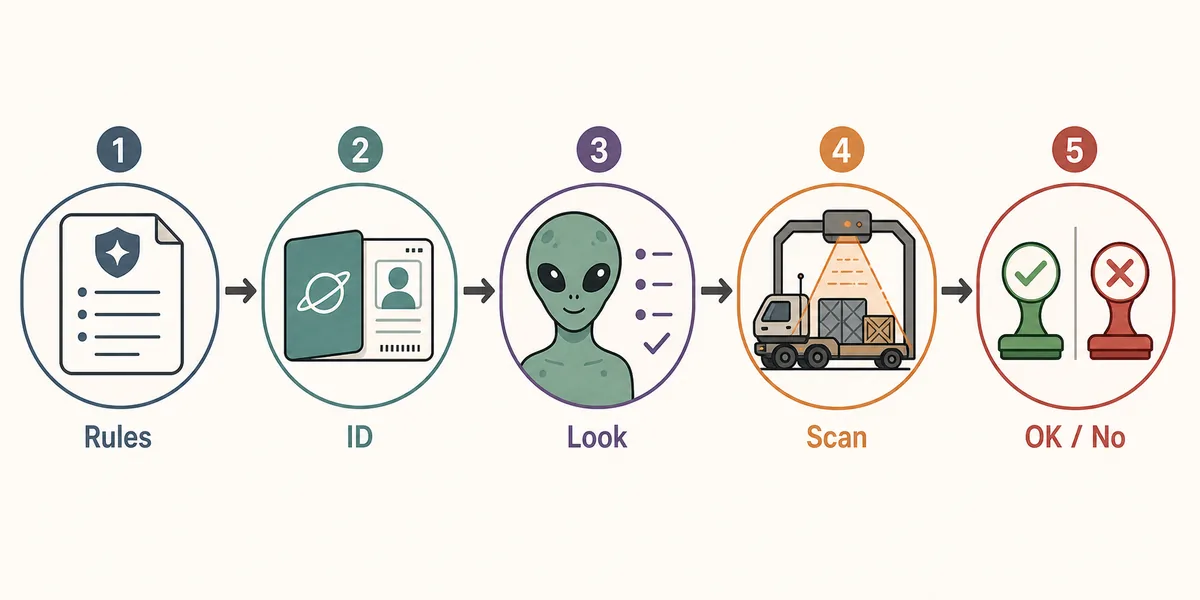
Use this order until it becomes automatic. It slows the first few cases down, but it prevents the most expensive beginner errors once the queue gets busier.
-
Read the current rule sheet before touching the stamp
Look for today-specific entry limits, date rules, required documents, banned cargo, vehicle instructions, and alerts. If a rule changed, say it aloud or note it before the first visitor.
-
Match identity fields from stable to variable
Start with name or ID, then origin, species, portrait or body cue, permit type, expiration date, and entry purpose. Fixed fields catch impostor-style contradictions quickly.
-
Compare the visitor with the paperwork
Use appearance, dialogue, hesitation, and species cues as supporting evidence. A strange look is not a violation unless it conflicts with the active rules or documents.
-
Pause for vehicle and cargo checks
Treat vehicle information as a second document set. Plate, cargo note, scanner result, manifest, and visitor story should agree before approval.
-
Decide and review the reason
Approve or deny only after you can name the reason. When you make a mistake, classify it as rule, ID, date, species, vehicle, cargo, or rushed judgment.
Beginner mistakes that cause bad approvals
Most errors are not from missing the entire case. They come from skipping one small comparison under pressure.
| Mistake | What it looks like | Better habit |
|---|---|---|
| Checking documents before rules | You find a mismatch but forget that the shift rule changed the decision. | Read the rule sheet first and revisit it after any penalty. |
| Rejecting every suspicious alien | The visitor looks odd, but the paperwork and rule sheet do not show a violation. | Use behavior as a prompt to inspect, not as proof. |
| Ignoring the vehicle layer | The passport looks clean, while cargo, plate, or scan evidence contradicts the story. | Finish the vehicle check before stamping. |
| Speeding up too early | You approve several easy cases, then miss a quiet date or origin mismatch. | Build a fixed order first; speed comes later. |
| Not reviewing penalties | A mistake happens, but you start the next case without naming the cause. | Write the missed category in one word and look for it next run. |
A short practice routine for the first hour
The fastest way to improve is to practice the inspection order in small blocks instead of trying to perfect every case immediately.
Run the first cases slowly
For the first 10 to 15 visitors, say each check in order. Rules, ID, species, date, purpose, vehicle, cargo, final reason.
Track only one error category at a time
If date mistakes are common, focus one run on dates. If vehicle misses are common, slow down whenever a vehicle appears.
Separate learning runs from score runs
A learning run is for reading feedback and testing habits. A score run is for speed after your order is stable.
Use the demo as a systems test
If you are playing a demo build, judge readability, feedback, pacing, and decision clarity rather than trying to memorize final-release details.
Use the shotgun only after the evidence is clear
The shotgun is part of XenoFeels' pressure and dark comedy, but using it as the first answer teaches the wrong habit. Treat it as the end of the case, not a shortcut around inspection.
Name the clue before acting
Before you shoot, deny, or approve, point to the exact clue: photo mismatch, fake license plate, prohibited object, wrong document field, poor disguise, or a rule conflict.
Check the vehicle when the person looks clean
Steam's game description highlights vehicles and fake plates, so a clean-looking alien can still fail because the car, cargo, or plate does not match.
Use demo runs to learn clue language
The released Steam demo is useful for learning how XenoFeels signals impostors, but exact cases can change before the 2026 full release.
Watch the official-style preview only for context
A trailer or gameplay preview can help you understand the inspection mood and interface rhythm, but the live Steam page should still be your source for release status, demo availability, screenshots, and system requirements.
What to read after this beginner guide
After you understand the basic loop, move into more specific pages only when they match your immediate problem.
Demo and download checklist
Use the demo guide when your question is whether a demo exists, where to download it safely, and how to test it without unsafe mirrors.
Vehicle inspection notes
Prioritize vehicle notes once you start missing plate, cargo, or scan contradictions.
Future wiki data pages
Documents, species clues, contraband, achievements, and shift rules should become dedicated pages as more stable public information is available.
How to play XenoFeels FAQ
Sources and verification points
- Official XenoFeels Steam page - Use for live store status, screenshots, release details, system requirements, and community information.
- SteamDB XenoFeels app record - Useful for Steam app metadata and history, but not a replacement for the Steam store download flow.