
Quick answer
Is there a XenoFeels demo?
The XenoFeels demo is not currently available as a verified install on the live Steam store page checked on September 19, 2026. The official listing remains the correct place to watch the 2026 release window, screenshots, system requirements, and any future demo button.
Do not treat random APK pages, repacks, cracked installers, or file mirrors as valid XenoFeels demo downloads. This guide focuses on the official Steam path, what to check after the demo launches, and how to evaluate the inspection loop without relying on unsafe download claims.
For XenoFeels download, APK, Android, and mobile searches, the verified path remains the official Steam listing and client. No official Android package, mobile store release, standalone PC mirror, or APK has been verified here.
Demo guide sections
Current XenoFeels demo status to verify
The latest official-source check on September 19, 2026 found no live demo install button. Keep the historical demo record separate from the current Steam availability state.
Official store first
Open Steam app 4293910 and look for the current install, wishlist, demo, release, and community information directly on Valve's store page.
Demo app signal
SteamDB lists a separate XenoFeels Demo app record, which is useful context, but it should not replace the live Steam store page for download decisions.
2026 release context
Because the full game is positioned around a 2026 PC release window, demo availability and build details may shift before launch.
How to download the XenoFeels demo safely on Steam
Use the same cautious path every time. The goal is not just to find a button; it is to avoid fake installers that borrow the XenoFeels name.
-
Start from the official Steam app page
Use the XenoFeels Steam listing linked from this guide or search for XenoFeels inside the Steam client. Check the developer/publisher area, store title, screenshots, and discussions before installing.
-
Look for the visible demo install button
The current main Steam page does not show a demo install button. Do not replace the removed official path with a mirror, archived executable, repack, or APK.
-
Read the recent store notes
Before launching, scan the release notice, update notes, language support, and system requirements. Demo builds can be older or narrower than the final game.
-
Keep the install inside Steam
Avoid executable files, archives, APKs, browser extensions, and third-party launchers claiming to be a XenoFeels demo unless the developer links them from an official channel.
What the XenoFeels demo should help you preview
A good demo session should answer whether you enjoy the inspection rhythm, not whether you can memorize every case before the full release. Use it to test pacing, readability, decision pressure, and how clearly the game explains mistakes.
| Demo area | What to check | Why it matters |
|---|---|---|
| Document reading | Names, species or origin fields, dates, permits, and entry reasons | The inspection loop only works if small contradictions are readable under time pressure. |
| Visitor cues | Dialogue, appearance, nervous behavior, and official rule conflicts | Suspicion should support evidence, not replace it. |
| Vehicle or cargo checks | Plate matching, cargo notes, scan results, and visitor claims | Vehicle evidence can change the final decision even when the paperwork looks clean. |
| Penalty feedback | How the demo explains wrong approvals or denials | Clear feedback tells you whether mistakes are learnable rather than random. |
First-run XenoFeels demo checklist
Run the demo slowly for the first few cases. The strongest players build a repeatable order before trying to speed through the queue.
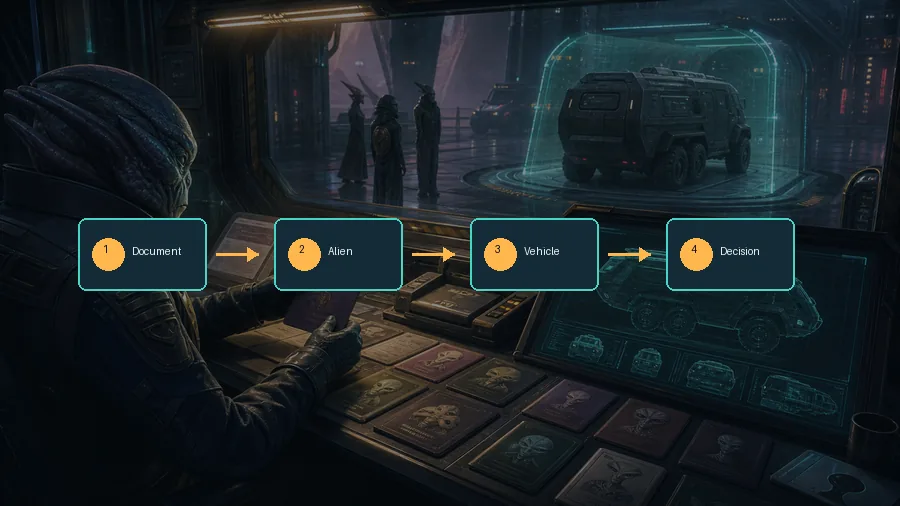
Read the active rule sheet before the first approval
Do not assume yesterday's rule still applies. Note the date rules, allowed entries, species limits, vehicle instructions, and any shift-specific alerts.
Compare identity fields in a fixed order
Move from name to species or origin, then document date, permit, entry reason, vehicle details, and special instructions. A stable order catches quiet mismatches.
Separate weird from illegal
A strange-looking alien is not automatically a failed case. Find a document mismatch, rule conflict, scan issue, or missing requirement before rejecting.
Pause when a vehicle appears
Treat the vehicle as another document. Match plate, cargo, scan evidence, and visitor statements before approving.
Write down the reason for each mistake
After the demo session, sort mistakes into date, identity, species, vehicle, cargo, behavior, or rushed decision. That turns penalties into useful practice notes.
Unsafe XenoFeels demo download signs
Download-intent searches are risky for unreleased or newly released games. Use this table when a page claims to host a XenoFeels demo outside Steam.
| Claim | Risk | Safer action |
|---|---|---|
| XenoFeels APK or mobile build | No official mobile store release has been verified here. | Use Steam or another developer-linked official store only. |
| Crack, repack, trainer, or patcher | These files can bundle malware and may not match the real game. | Skip the download and check the Steam listing. |
| Password-protected archive | This often prevents scanning and hides the real executable contents. | Do not install it. |
| Fake early access key generator | Key generators are common phishing and malware traps. | Use Steam wishlist, demo, or purchase options only. |
XenoFeels demo FAQ
Sources and verification points
- Official XenoFeels Steam page - Use for the live release window, current store availability, screenshots, discussions, and system requirements; the demo install button is no longer shown.
- SteamDB XenoFeels app record - Useful for Steam app metadata and historical store tracking.
- SteamDB XenoFeels Demo record - Useful context for demo app tracking, not a replacement for Steam's own download flow.